A Complete Saily Japan eSIM Review, Based on My IRL Experiences
*Disclaimer: This blog is reader-supported, and this page might therefore contain affiliate links. When you book or buy through them, I may earn a small commission at no extra cost to you. It helps me write these in-depth and original guides, so thank you for the support! Full Affiliate Disclosure
Since I’m based in Europe (and largely travel around Europe), I often don’t need to buy an eSIM for my travels. This, however, was not the case when I booked my first trip to Japan. While my mobile plan lets me use my data in several places, this was not one of those. As a result, I wanted to give Saily’s Japan eSIM a go for my two-week adventure.

-ARTICLE CONTINUES BELOW-
Get My Japan Golden Route Guides Delivered to Your Inbox
Save time on researching and get all my Golden Route travel guides delivered straight to your email inbox, plus some extra tips and newsletter updates. Unsubscribe anytime.
I knew that I’d have free Wi-Fi in the places I was staying, but at the same time, I wanted to be connected on the go. I had no idea what the public Wi-Fi would be like, and I also wanted to navigate if we got lost.
Besides wanting something that actually worked, I’m a sucker for good branding. Saily certainly has that, but I know that this doesn’t always translate to a good product. So, is Saily’s Japan eSIM worth using?
In this complete review, I’ll share my pros and cons of using it on my travels through the country. You’ll get all the other information you need to know, too.
I partnered with Saily to use their eSIM on my Japan trip. However, all opinions in this article are my own.
What Are Saily’s eSIM Options for Japan?
Saily has six eSIM data plan options for Japan. You have five set choices, along with an unlimited plan that you can customize. Below are your set choices and their prices:
- 1 GB (7 Days): $3.99
- 3 GB (30 Days): $7.99
- 5 GB (30 Days): $10.99
- 10 GB (30 Days): $17.99
- 20 GB (30 Days): $24.99
In addition to the above, you can pick an option with unlimited data. With this one, you can pick whether it’s valid for 5, 10, 15, 20, 25, or 30 days. Prices range from $18.99 for five days to $71.99 for 30 days.
For what it’s worth, I used the 20 GB data plan when I visited. If you’re close to running out of data, you can top up your plan.
By the way… If you use my code DANNYCPH at checkout, you’ll get a 10% discount 🙂
Where Else Is Saily Available?
If you’re visiting other countries alongside Japan, you can also use Saily. You can pick from different regions, such as Asia and Oceania, which is useful if you’re visiting other places in this part of the world. Individually, you can use the eSIM in 200+ destinations worldwide.
Besides choosing specific countries and regions, Saily has the Ultra plan. With this, you get internet access in over 100 locations across the globe. You also get other perks, such as priority support and access to various security tools.
My Experiences Using Saily’s eSIM in Japan
When I visited Japan, I spent two weeks exploring Tokyo, Kyoto, and Osaka. I also stayed overnight in Kawaguchiko, one of the towns near Mount Fuji. This is a pretty common route for first-time visitors, and you’ll probably do at least part of this route when you visit.
I mainly used my Saily eSIM for navigation and to book tickets on the go. Google Maps works really well in Japan, and Tokyo in particular was a mammoth to navigate. My girlfriend actually had issues using the public Wi-Fi in Tokyo, so it was extremely helpful for us to have an eSIM in these circumstances. I also used my data to order Uber in Kyoto because the public transport there is not as good as in other Japanese cities.



I also used Saily when I needed to do some research while we were traveling, and it was nice to listen to music on our bus from Tokyo to Kawaguchiko, since the Wi-Fi was spotty. I have to say that I’m often more skeptical of using mobile data in built-up urban areas (I used to have lots of issues when I lived in London, for example), but this wasn’t such a big problem for me in Tokyo or any of the other cities we went to.
I didn’t use my eSIM to randomly scroll on the internet. To be honest, I only really took my phone out when necessary. This is partly because I’ve put in a lot of effort to remove my scrolling habit, and also because I felt no need to do so in the first place.
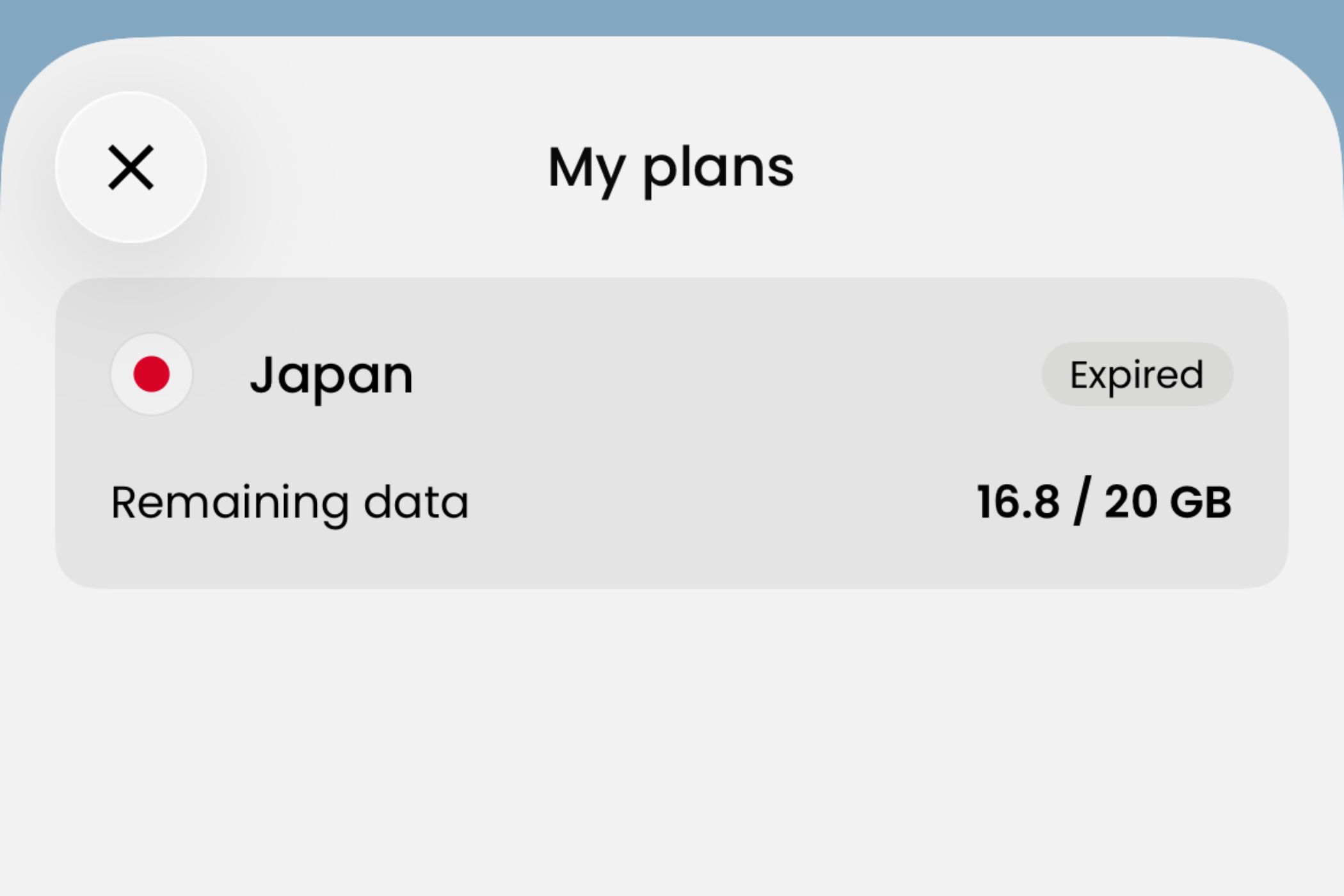
With all my usage in mind, I used 3.2 GB of my 20 GB allowance during my two-week trip to Japan. This isn’t a huge amount, but I guess it was nice to at least know that I had the option if I had to, for example, navigate more.
What I Liked About Saily’s Japan eSIM
Now that I’ve covered what I used my Saily eSIM for in Japan, I’ll discuss the pros and cons. First, I’ll talk about what I liked about using Saily during my trip.
1. It’s Very Easy to Set Up on Your Phone
I used to dread traveling outside the UK and Europe and needing to change my physical SIM card, largely because I didn’t want to lose my main one. So, I’d often buy a plan with my network provider, which would end up being more expensive in most cases.
Those days are gone, though, and I really think you’re missing out in general if you aren’t using an eSIM. However, I was still worried that setting up Saily would be difficult. Those fears were not necessary, though, as it was incredibly easy to get everything installed correctly.
After getting my Saily data, I just needed to use the mobile app and then go to my device’s settings. For what it’s worth, I use an iPhone; in your settings, it’s very easy to change your eSIM via the Cellular section. Your settings may differ if you have a different device, but I still don’t think it’ll be complicated to set up.
I added the data just before flying and changed to my travel eSIM after landing at Haneda Airport without issues; the airport has free Wi-Fi, which meant I could access the Saily app.
Once I returned to Europe after my trip, it was easy to switch back to my main eSIM.
2. For the Most Part, I Didn’t Have Issues With Connectivity
Obviously, it wouldn’t have been fun to buy an eSIM and constantly struggle with connectivity. Thankfully, this was not the case. While I had downloaded offline maps for Tokyo, Kyoto, and Osaka before my trip, I didn’t need to use these.
As mentioned earlier, I’ve often had problems with mobile connectivity in dense, built-up areas. Just a few weeks before this trip to Japan, I went to Paris and used my normal network from home. However, I often ran into issues with using my phone’s internet. I had no such issues in any of the major cities I visited in Japan with Saily, though.

Even on the Subway in Tokyo and Osaka, I was still connected when needed. We also walked around Lake Kawaguchiko, which is a bit more remote, but we again didn’t have any issues using my phone.
Of course, part of an eSIM’s connectivity will depend on the local providers and where you are, too. However, I had LTE, 4G, and 5G connections in most places. I can imagine that I would have potentially stumbled into connectivity problems in more rural locations, but for my specific needs, it was fine.
3. Saily Has Good Options for Short-Term and Long-Term Travelers
Two weeks is a good amount of time for a first trip to Japan, but it’s still short in the grand scheme of things. While I want to go back to Japan multiple times in the future as a tourist, I’d also like to—at some point—do a six-month digital nomad stint there. I guess I just need to keep working on my blog so that I meet all the requirements to qualify for their digital nomad visa, but anyway. 🤪
When I return to Japan for longer stints to visit and work remotely, I will use Saily for my data provider. The reason is simple: You’ll find an option that fits you, regardless of how long you’re going to be in the country for. You will also find great choices if you plan to also visit neighboring countries, such as South Korea.
4. Saily’s Japan eSIMs Are Affordable
All things considered, I think that Saily’s Japan eSIMs are a very reasonable price. The 20 GB plan, which costs $24.99 for 30 days, will have most people covered. To be honest, you could also probably get away with buying even less if you don’t plan to use your phone beyond navigation and the basics.
In many cases, you might get a better deal compared to buying data for Japan from your ordinary network provider that you use at home. This will vary, though, depending on where you live and which service you use. So, I’d definitely recommend checking to see how much you would pay per day with your provider at home if you haven’t already.

What I Didn’t Like About Saily’s Japan eSIM
While I was mostly happy with my experience in Japan, not everything was perfect. Below, I’ll share some of my biggest annoyances that I encountered when using Saily on my trip. After reading these points, you can then decide if these are problems you’re willing to deal with.
1. Some Websites Wouldn’t Load
For the most part, I didn’t have problems using the internet when needed. However, there were a few occasions when I wanted to get some information about where I was visiting from Reddit and couldn’t. Whenever I opened Safari and tried to click on discussions (which I mainly did after searching for them), the site wouldn’t load.
This wasn’t a major issue in the end, since nine times out of 10, I could just wait until I was on Wi-Fi. However, I must say that I found it quite frustrating in the beginning. I could access most sites that weren’t geo-restricted, but this is something to keep in mind.
2. Plans Include Data Only, Not Phone Calls or SMS
Okay, so for me, this wasn’t a massive problem because I hate talking on the phone anyway. Also, I was only away for two weeks and nobody called me during that time anyway. However, Saily’s Japan eSIM plans only include mobile data. If you often speak to others on the phone, this can be an issue.
You also cannot send ordinary SMS messages with Saily’s plans. However, I had no problems using WhatsApp or iMessage. Both of these, along with other messaging services like Facebook Messenger and Signal, are still accessible when you use Saily. When I used WhatsApp, I didn’t need to change my number or anything; everything worked as it would if I was at home instead.
As for calls, you can get around the issue of no mobile calls by using tools like WhatsApp and FaceTime. I guess this would be a problem if your friends and family were adamant about calling them via the Phone app or your device’s equivalent, likewise for wanting to send standard SMS messages, but… it’s 2026. 🤷🏾♂️

3. You Have to Buy Data at Most 30 Days Before Your Trip
Yes, that’s not a typo. At most, you can buy your eSIM data 30 days before your Japan trip with Saily. If you don’t activate it within 30 days, it’ll automatically do so on its own.
Whether this is an issue for you or not depends on how much of an advance planner you are. I like to plan very far before my trip, which I guess is why I run a travel blog sharing tips to help people plan their own adventures, but I digress.
As long as you activate your eSIM within that timeframe, you won’t have issues. Just remember to actually buy your mobile data before you travel.
Important Things to Know Before You Buy Your Saily Japan eSIM
Now that you know my benefits and drawbacks for using Saily in Japan, I’ll go over some more important things to know before you buy it.
Check That Saily Is Compatible With Your Mobile Device
Saily is compatible with most modern smartphones and tablets. You almost certainly won’t have any issues if your device is relatively new and can run eSIMs. However, I’d recommend double-checking that you can actually use the service before buying your data plan.
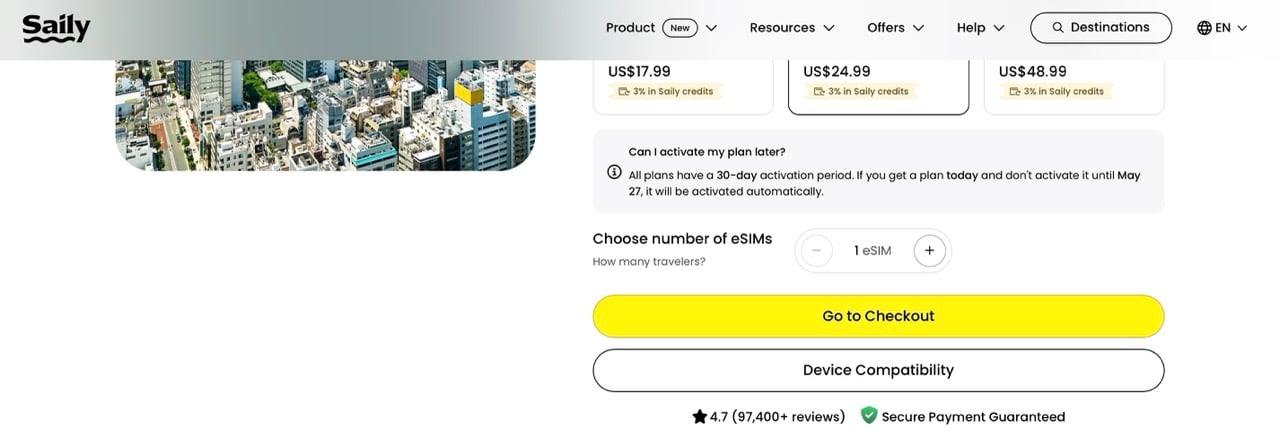
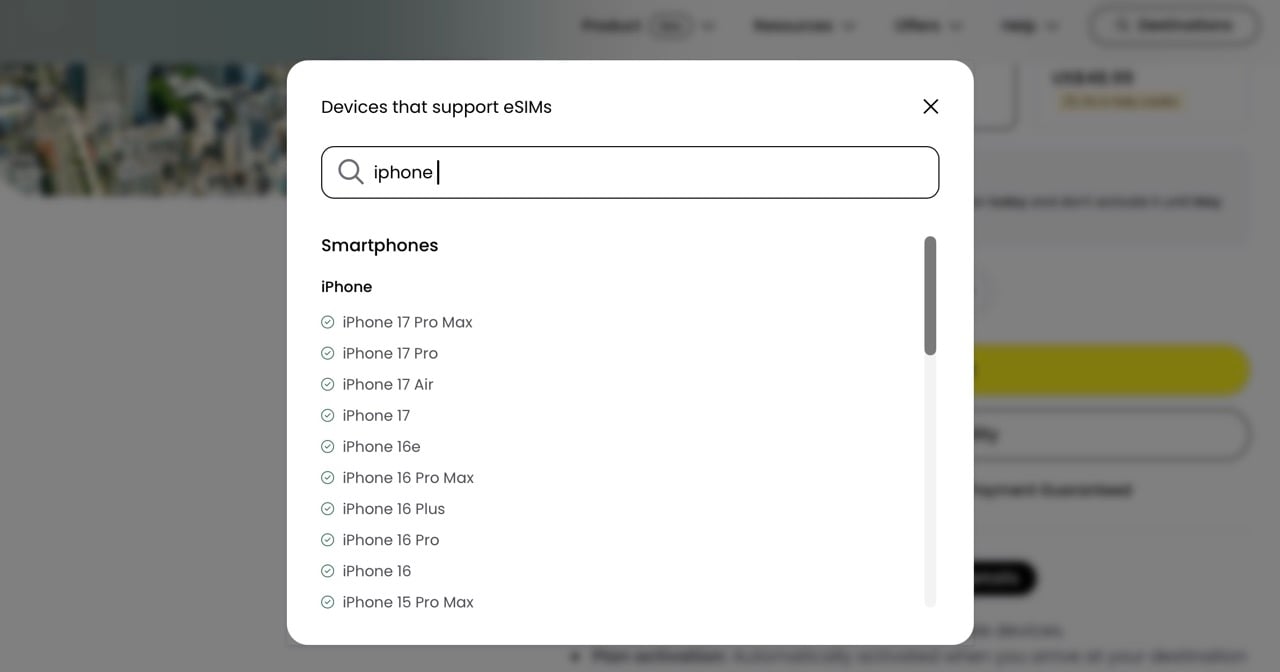
You can find out if your device is compatible by going to the Device Compatibility button, which is below the eSIM plans. Once you’re there, enter your device or tablet model. You’ll then see if you can use Saily or not. If you can’t initially see your device, scroll to the bottom and select See Full List.
If You Need Help, You Can Use the Customer Support in the App
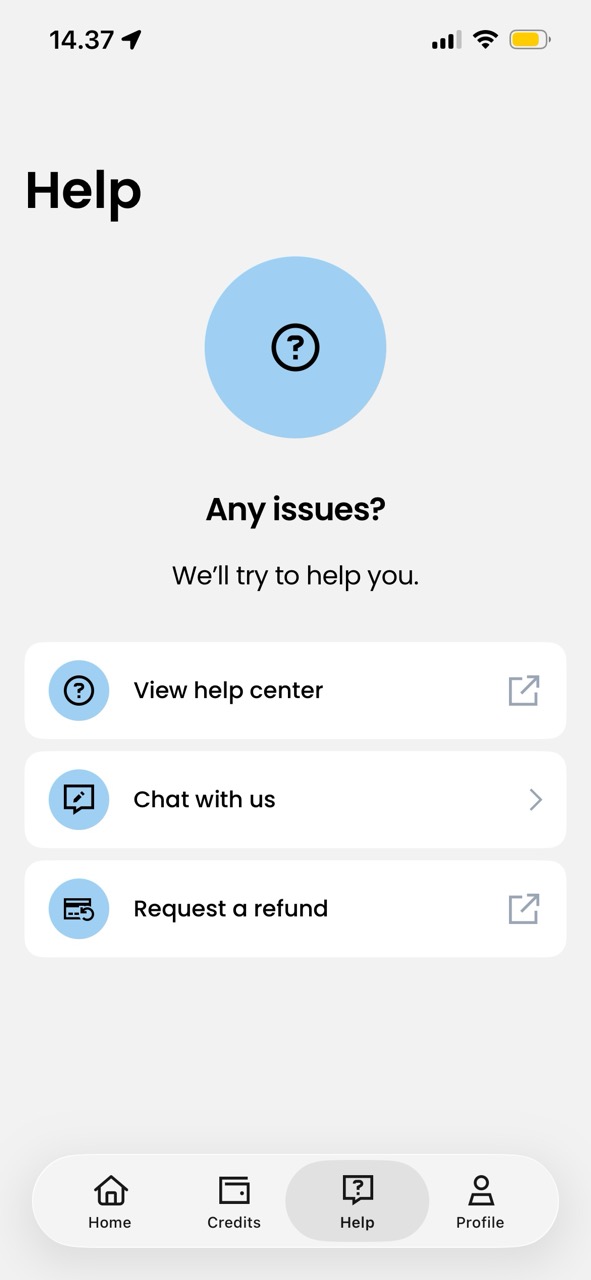
I didn’t have any issues with Saily when using my eSIM, but if you do have problems, you can contact customer support via the app. You can access Live Chat by selecting Help > Chat with us.
If you have a small issue, you can also try using the help center, which is accessible via the Help tab, too.
Saily Will Let You Know When You’ve Almost Used Up Your Data
As I mentioned earlier, you can top up your data if needed. Before you use it up, though, you’ll get a notification telling you when you’ve consumed 80% of your plan. That way, you have enough time to add more GB if needed.
In the Saily app, you can also check how much data you have left on your plan. To make sure you know when you’re close to using up what you have, you’ll need to turn on notifications for Saily on your device.
I Used My eSIM on the Golden Route; YMMV May Vary Elsewhere
Japan is a huge country, and you have a 0% chance of seeing everything in the first two weeks. To be honest, you could keep yourself entertained solely if you planned a trip to Tokyo and spent the whole time there.
I visited the Golden Route, which is very different from if I was going hiking in the middle of nowhere. If you’re visiting this part of the country as well, you’ll probably have no issues with connectivity. But if you’re planning to get really remote, you might have more problems with using your eSIM.

Which Saily Plan Should You Get?
This will largely depend on your average data usage. Annoyingly, Saily doesn’t have a 15 GB eSIM plan at the time of writing, which I think would be perfect for most travelers on a two-week trip. 20 GB is a safe choice if you’re visiting for two weeks, and it’s not much more expensive than 10 GB—though you could get away with 10 GB if you’re not a big internet user.
Keep in mind that you’ll likely only use your eSIM when out of your accommodation, which will naturally bring down how much data you use from your plan. I’d say that you should pick either 10 GB or 20 GB for a two-week trip; if you choose the former, you can top up if needed.
For a three-week trip, I think that 20 GB is enough in most cases. I don’t think there’s much of a reason to get the Unlimited plan unless you won’t have access to Wi-Fi at any of your accommodation, but even then, you can often access it from big café chains and convenience stores.
… So, Is the Saily Japan eSIM Worth It?
Based on my real-life experiences, I think that Saily is a great eSIM to use for Japan. I didn’t have issues with connectivity throughout my trip, and it more than served my needs.
While I had minor problems accessing some websites, I could mostly browse whenever I had to. Moreover, Google Maps worked without any problems. Setting up the eSIM is very simple, too, and so is switching back once you return from the trip.
Another advantage is that you can find an eSIM plan that meets your short-term and long-term travel needs. While you’ll need to find alternative ways to call people or send SMS messages, these won’t be major problems for most people.
If you’re ready to buy data for your Japan trip, remember to use my code DANNYCPH at checkout and get a 10% discount with Saily. Shop all eSIM plans ⛩️
More Useful Resources for Your Japan Trip 🗾
Search for Hotels: Booking.com / Hotels.com / Expedia / Agoda
Browse the Best Tours in Japan: Viator / GetYourGuide / Klook

Pin for Later 📌